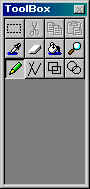
 ENABLE時が
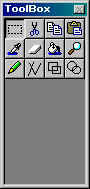 と、いい感じ。(ちなみに一番上の右3個のボタンだぞ)
ツールバーのボタンがDISABLE状態の時のアイコンビットマップのラクチン描画方法を探していたのだが、このほどここで発見した。っていうか「思いつくがコード書くと面倒だぜ~。もっと楽なのは無いか~」の、結局思いついてたコードと同じ発想だったりして。ただBitBlt()のROPが謎な値なのがワザワザ余所から持ってきた意味があるトコロではある。元ソースはC++だったんでCにテキトーに変換した後、利用させて頂いた。
以下は変換後のソース。単なるCに変換に留まらずコーディング主義の違いもやや入っているが気にスルな。
#include <windows.h>

void DitherBlt( HDC hdcDest, int nXDest, int nYDest, int nWidth
			, int nHeight, HBITMAP hbm, int nXSrc, int nYSrc )
{
	// Create the monochrome DIB section with a black and white palette
	struct {
		BITMAPINFOHEADER bmiHeader;
		RGBQUAD          bmiColors[2];
	} RGBBWBITMAPINFO = {
		{   // a BITMAPINFOHEADER
			sizeof(BITMAPINFOHEADER),   // biSize
			nWidth,                     // biWidth
			nHeight,                    // biHeight
			1,                          // biPlanes
			1,                          // biBitCount
			BI_RGB,                     // biCompression
			0,                          // biSizeImage
			0,                          // biXPelsPerMeter
			0,                          // biYPelsPerMeter
			0,                          // biClrUsed
			0                           // biClrImportant
		},
		{
			{ 0x00, 0x00, 0x00, 0x00 }, // Black
			{ 0xFF, 0xFF, 0xFF, 0x00 }  // While
		}
	};
	HDC      hDC   = NULL;
	HDC      bwDC  = NULL;
	HBITMAP  hbmBW = NULL;
	HBRUSH   hb;
	HBRUSH   oldBrush;
	VOID    *pbitsBW;
	RECT     rc;


	// Create a generic DC for all BitBlts
	hDC = CreateCompatibleDC( hdcDest );
	if ( hDC == NULL ) {
		goto DitherBlt_Exit;
	}

	// Create a DC for the monochrome DIB section
	bwDC = CreateCompatibleDC( hDC );
	if ( bwDC == NULL ) {
		goto DitherBlt_Exit;
	}

	hbmBW = CreateDIBSection( bwDC
	                        , (LPBITMAPINFO)&RGBBWBITMAPINFO
	                        , DIB_RGB_COLORS
	                        , &pbitsBW
	                        , NULL
	                        , 0
	                        );
	if ( hbmBW == NULL ) {
		goto DitherBlt_Exit;
	}

	// Attach the monochrome DIB section and the bitmap to the DCs
	SelectObject( bwDC, hbmBW );
	SelectObject( hDC, hbm );

	// BitBlt the bitmap into the monochrome DIB section
	BitBlt( bwDC, 0, 0, nWidth, nHeight, hDC, nXSrc, nYSrc, SRCCOPY );

	// Paint the destination rectangle in gray
	SetRect( &rc ,nXDest, nYDest, nXDest + nWidth, nYDest +	nHeight);
	FillRect( hdcDest, &rc, GetSysColorBrush(COLOR_3DFACE) );

	// BitBlt the black bits in the monochrome bitmap into COLOR_3DHILIGHT bits in the destination DC
	// The magic ROP comes from the Charles Petzold's book
	hb = CreateSolidBrush( GetSysColor(COLOR_3DHILIGHT) );
	oldBrush = (HBRUSH)SelectObject( hdcDest, hb );
	BitBlt( hdcDest, nXDest + 1, nYDest + 1, nWidth, nHeight
	      , bwDC   , 0         , 0
	      , 0xB8074A
	      );

	// BitBlt the black bits in the monochrome bitmap into COLOR_3DSHADOW bits in the destination DC
	hb = CreateSolidBrush( GetSysColor(COLOR_3DSHADOW) );
	DeleteObject( SelectObject(hdcDest,hb) );
	BitBlt( hdcDest, nXDest, nYDest, nWidth, nHeight
	      , bwDC   , 0     , 0
	      , 0xB8074A
	      );
	DeleteObject( SelectObject(hdcDest,oldBrush) );

DitherBlt_Exit:
	if ( bwDC ) {
		DeleteDC(bwDC);
	}
	if ( hDC ) {
		DeleteDC(hDC);
	}
}
|
むぅ。hbmBWのDeleteObject()が無いが、たぶんDC廃棄時に一緒になくなるんだろう(本当か?で、調べたら見事にリソースリークしてたよ)。あとhdcDestに2回Bltする関係でちらつく。この辺り改善したいトコロである。
んで、これを利用したビットマップ描画関数。
void DrawUIBitmap( HDC hDcDst, int nXDst, int nYDst, int nWidth, int nHeight
		, HBITMAP hBm, int nXSrc, int nYSrc, BOOL bEnable )
{
	if ( bEnable ) {
		HBITMAP		hBmOld;
		HDC		hDcBm;

		hDcBm  = CreateCompatibleDC( hDcDst );
		hBmOld = SelectObject( hDcBm, hBm );
		BitBlt( hDcDst, nXDst, nYDst, nWidth, nHeight
		      , hDcBm , nXSrc, nYSrc
		      , SRCCOPY
		      );
		if ( hBmOld ) {
			SelectObject( hDcBm, hBmOld );
		}
		DeleteDC( hDcBm );
	} else {
		DitherBlt( hDcDst, nXDst, nYDst, nWidth, nHeight
		         , hBm   , nXSrc, nYSrc
		         );
	}
}
|
さっき書いたチラツキ防止はこっちに入れる方が楽かな?
んで、これを使うように変更したToolBox.cのボタン描画部分。
static void OnDraw( HWND hWnd, HDC hDC )
{
	ToolBoxCC *pCC = (ToolBoxCC *)GetWindowLong( hWnd, GWL_USERDATA );
	ToolBtn	  *pTB;
	HBITMAP	   hBm;

	hBm    = LoadImage( pCC->hInst
			  , pCC->pszImg
			  , IMAGE_BITMAP
			  , 0, 0
			  , LR_LOADMAP3DCOLORS
			  );

	pTB = (ToolBtn *)pCC->root;
	while ( pTB ) {
		if ( pTB->bSelected || pTB->bPushed ) {
			DrawFrameControl( hDC, &pTB->rc, DFC_BUTTON, DFCS_BUTTONPUSH | DFCS_PUSHED );
			DrawUIBitmap( hDC
				    , pTB->rc.left + 3, pTB->rc.top + 3, 16, 16
				    , hBm
				    , 16 * pTB->nIdBmp, 0
				    , pTB->bEnable
				    );
		} else {
			DrawFrameControl( hDC, &pTB->rc, DFC_BUTTON, DFCS_BUTTONPUSH );
			DrawUIBitmap( hDC
				    , pTB->rc.left + 2, pTB->rc.top + 2, 16, 16
				    , hBm
				    , 16 * pTB->nIdBmp, 0
				    , pTB->bEnable
				    );
		}
		pTB = (ToolBtn *)pTB->next;
	}

	DeleteObject( hBm );
}
|
上記は“+ 2”とかマジックナンバーになている辺りをGetSystemMetrics()API辺りを使って清く正しく美しく修正すると良いだろう。“+
3”はソレ+1って事で。さらにボタンが大きい時は中央に描画、小さい時はクリッピングなんかしちゃったりするとベリグーだろう。自分は面倒なのでお金貰う仕事でもなければやらない。
ちなみに“+ 2”ってのはボタンのエッジ部分(陰影)の幅だ。
結果は、DISABLE時がENABLE時がと、いい感じ。(ちなみに一番上の右3個のボタンだぞ)